
.png)
Description
Download LastPass Password Management – Secure Password Manager, Free Trial, Multi‑Device Sync
Overview
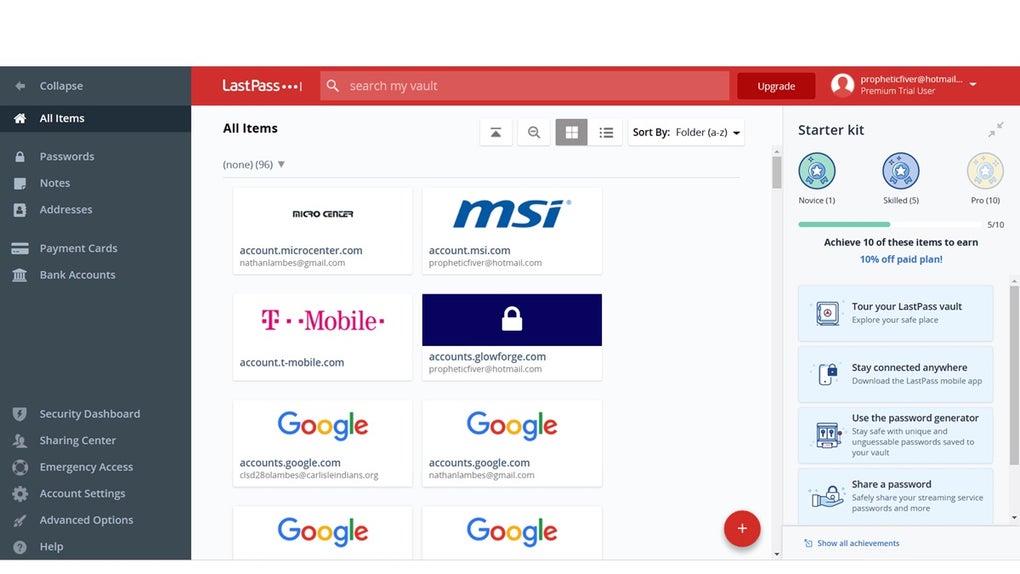
LastPass Password Management is a cloud‑based password vault that lets you store, generate, and retrieve credentials with a single, encrypted master password. The trial version gives you full access to the core toolkit: an encrypted vault, a powerful password generator, secure password sharing, automatic form filling, and real‑time synchronization across Windows, macOS, Android, and iOS devices. By using industry‑standard AES‑256 encryption, LastPass ensures that your sensitive data never leaves your device in plain text. The web‑app interface is designed for both beginners and power users, offering a clean dashboard where you can organize logins, notes, and secure documents into folders and tags. Whether you are a solo freelancer juggling dozens of client portals or a family looking for a safe way to share Wi‑Fi passwords, LastPass provides a flexible, user‑friendly solution that removes the need to remember complex strings while keeping your digital identity safe from phishing, credential stuffing, and data breaches.
Key Features of LastPass
- Encrypted Vault: All passwords, notes, and secure files are stored in an AES‑256 encrypted vault that only you can unlock with your master password.
- Password Generator: Create strong, unique passwords with customizable length, symbols, and character sets—all with one click.
- Secure Password Sharing: Share login credentials with family members or teammates without exposing the actual password; recipients receive a one‑time link that can be revoked at any time.
- Automatic Form Filling: Save time on repetitive web forms—LastPass auto‑populates usernames, passwords, addresses, and payment details across browsers.
- Multi‑Device Sync: Your vault updates instantly on Windows, macOS, Linux, Android, and iOS, ensuring you have access wherever you go.
- Security Dashboard: Receive a health score, identify weak or reused passwords, and get actionable alerts when a site you use has been compromised.
- Biometric & Multi‑Factor Authentication: Enhance protection with fingerprint, Face ID, or authenticator apps for an extra layer of security.
- Secure Notes & Document Storage: Keep sensitive information such as license keys, insurance policies, or confidential contracts safely encrypted.
- Browser Extensions: Dedicated extensions for Chrome, Firefox, Edge, and Safari streamline login capture and autofill directly from the browser toolbar.
- Emergency Access: Designate trusted contacts who can request vault access in case of emergency, with configurable waiting periods.
Installation & Usage Guide
Getting started with LastPass is straightforward, whether you prefer the web portal, desktop client, or mobile app. Follow these steps to download, install, and begin managing your passwords securely:
- Create a LastPass Account: Visit the official website and click “Start Free Trial.” Enter your email address, choose a strong master password (the only password you’ll need to remember), and confirm your account via the verification email.
- Download the Application:
- For Windows: Download the Windows installer (EXE) and run it. The installer automatically adds the browser extension.
- For macOS: Grab the macOS package (DMG) and drag the app to your Applications folder.
- For Android: Search “LastPass” in the Google Play Store and tap “Install.”
- For iOS: Find “LastPass” in the Apple App Store and download it.
- Log In and Set Up Your Vault: Launch the app or open the browser extension, enter your master password, and click “Log In.” The first‑time setup wizard will guide you through importing existing passwords from browsers or CSV files.
- Configure Security Settings: Navigate to “Account Settings → Multifactor Options” and enable a second factor (Google Authenticator, Duo, or biometrics). Turn on “Security Dashboard” to receive ongoing health reports.
- Start Using Autofill: When you visit a login page, click the LastPass icon in the browser toolbar or use the shortcut (Ctrl+Shift+L on Windows, ⌘+Shift+L on macOS). Select the appropriate entry, and LastPass will fill in the credentials instantly.
- Organize & Share: Create folders for work, personal, and shared credentials. To share a password, right‑click the entry, choose “Share,” and enter the recipient’s email. You can set expiration dates or one‑time view limits.
- Backup & Export (Optional): Export a CSV backup from the vault settings for offline archiving. Remember to keep the CSV encrypted if you store it locally.
Once installed, LastPass runs silently in the background, syncing changes across all devices within seconds. The web interface (https://lastpass.com) provides a full‑screen view of your vault for quick management from any computer without installing the client.
Compatibility, Pros & Cons
LastPass supports a broad range of operating systems and browsers, ensuring you can protect your credentials no matter which platform you use daily. Officially compatible with:
- Windows 10, 11, and Windows Server (64‑bit)
- macOS 10.15 (Catalina) and later
- Linux distributions with Chrome, Firefox, or Chromium browsers
- Android 6.0 (Marshmallow) and later
- iOS 13 and later (iPhone, iPad)
- Major browsers: Chrome, Edge, Firefox, Safari, Opera
Pros
- End‑to‑end AES‑256 encryption keeps data secure even if the cloud service is compromised.
- Cross‑platform sync works instantly, so you never lose access to passwords on the go.
- Rich feature set (password generator, secure sharing, emergency access) available in the free trial.
- Biometric and multi‑factor authentication add strong layers of protection.
- User‑friendly UI with drag‑and‑drop organization, making it easy for non‑technical users.
- Regular security audits and transparent breach notifications build trust.
Cons
- Free trial limits some premium features such as dark web monitoring and advanced 1‑GB encrypted file storage.
- Occasional sync latency on slower internet connections, though rare.
- Master password recovery relies on emergency contacts; no built‑in password reset if all contacts are unavailable.
- Some users report a learning curve when first configuring multifactor options.
- Browser extensions can conflict with ad‑blockers or privacy extensions if not whitelisted.
LastPass delivers a robust, secure, and highly usable password management solution that works across all major platforms. The encrypted vault, intuitive UI, and extensive feature list make it a top choice for individuals and small teams. While the free trial does impose a few premium restrictions, the overall value and peace of mind are well worth the modest subscription cost for power users.
Frequently Asked Questions
Is LastPass really free to use?
LastPass offers a free tier that includes unlimited password storage, password generator, and basic autofill. The trial version provides temporary access to premium features for evaluation. After the trial, you can continue with the free plan or upgrade to a paid subscription for advanced tools like dark web monitoring and encrypted file storage.
How does LastPass protect my master password?
Your master password never leaves your device. It is used locally to derive an encryption key that encrypts your vault data before it is uploaded to the cloud. This zero‑knowledge architecture means LastPass staff cannot view or retrieve your master password or the decrypted contents of your vault.
Can I share passwords securely with non‑LastPass users?
Yes. LastPass generates a one‑time secure link that can be sent via email or messaging. Recipients do not need a LastPass account to view the shared credentials, and you retain the ability to revoke access at any moment.
What happens if I forget my master password?
Because of the zero‑knowledge design, LastPass cannot reset your master password. You will need to use the Emergency Access feature you set up during onboarding, or reset the vault entirely (which will delete all stored data). This reinforces the importance of choosing a memorable yet strong master password and configuring trusted emergency contacts.
Does LastPass work offline?
Yes. The encrypted vault is cached locally on each device, allowing you to retrieve and autofill passwords even without an internet connection. Changes made offline sync automatically once you reconnect to the internet.
Conclusion – Why You Should Download LastPass Today
In a world where credential theft is a daily headline, a reliable password manager is no longer a luxury—it’s a necessity. LastPass combines industry‑leading encryption, seamless multi‑device sync, and a feature‑rich interface that caters to both novices and seasoned security enthusiasts. The free trial lets you explore premium tools without commitment, and the robust security dashboard continuously monitors the health of your passwords. Whether you’re looking to replace a spreadsheet of logins, need secure password sharing for a small team, or simply want the peace of mind that comes from automated strong password generation, LastPass delivers a comprehensive solution that scales with your needs. Click the download button below, set up your master password, and experience a safer, faster way to manage every credential you own.
Guides & Tutorials for LastPass Password Management
How to install LastPass Password Management
- Click the Preview / Download button above.
- Once redirected, accept the terms and click Install.
- Wait for the LastPass Password Management download to finish on your device.
How to use LastPass Password Management
This software is primarily used for its core features described above. Open the app after installation to explore its capabilities.
User Reviews for LastPass Password Management 0
No reviews found




